
引言
WebSocket 是现代 Web 开发中实现实时双向通信的重要技术。本文将从基础概念开始,深入探讨 WebSocket 的工作原理、实现方式和最佳实践,帮助开发者全面掌握这项技术。
目录
- 什么是 WebSocket
- WebSocket 协议详解
- WebSocket 与 Socket 的区别
- 工作原理
- 核心特征
- 应用场景
- 代码示例
- 性能优化
- 安全性考虑
- 常见问题与解决方案
- 浏览器兼容性
- 最佳实践
什么是 WebSocket
WebSocket 是一种在单个 TCP 连接上进行全双工通信的协议。它允许服务器主动向客户端推送数据,而不需要客户端发起请求,从而实现真正的实时通信。
与 HTTP 的区别
| 特性 | HTTP | WebSocket |
|---|---|---|
| 连接类型 | 短连接,每次请求都需要握手 | 长连接,只需握手一次 |
| 通信方向 | 单向,只能由客户端发起请求 | 双向,服务器可主动推送数据 |
| 协议标识 | http:// / https:// |
ws:// / wss:// |
| 开销 | 每次请求都有 HTTP 头部开销 | 握手后数据传输开销极小 |
| 实时性 | 需要轮询或长轮询 | 真正的实时通信 |
WebSocket 协议详解
握手阶段
客户端握手请求
客户端发起握手请求,请求头中包含关键字段:
GET /chat HTTP/1.1
Host: server.example.com
Upgrade: websocket
Connection: Upgrade
Sec-WebSocket-Key: dGhlIHNhbXBsZSBub25jZQ==
Sec-WebSocket-Version: 13
Origin: http://example.com
关键字段说明:
Upgrade: websocket- 请求协议升级到 WebSocketConnection: Upgrade- 表示连接升级Sec-WebSocket-Key- 客户端生成的随机密钥Sec-WebSocket-Version- WebSocket 协议版本
服务器握手响应
服务器验证请求并返回响应:
HTTP/1.1 101 Switching Protocols
Upgrade: websocket
Connection: Upgrade
Sec-WebSocket-Accept: s3pPLMBiTxaQ9kYGzzhZRbK+xOo=
Sec-WebSocket-Accept 计算方法:
- 将
Sec-WebSocket-Key与魔法字符串258EAFA5-E914-47DA-95CA-C5AB0DC85B11拼接 - 对拼接结果进行 SHA-1 哈希计算
- 将哈希结果进行 Base64 编码
数据传输阶段
数据帧结构
WebSocket 数据以帧的形式传输:
 0                   1                   2                   3
 0 1 2 3 4 5 6 7 8 9 0 1 2 3 4 5 6 7 8 9 0 1 2 3 4 5 6 7 8 9 0 1
+-+-+-+-+-------+-+-------------+-------------------------------+
|F|R|R|R| opcode|M| Payload len |    Extended payload length    |
|I|S|S|S|  (4)  |A|     (7)     |             (16/64)           |
|N|V|V|V|       |S|             |   (if payload len==126/127)   |
| |1|2|3|       |K|             |                               |
+-+-+-+-+-------+-+-------------+ - - - - - - - - - - - - - - - +
|     Extended payload length continued, if payload len == 127  |
+ - - - - - - - - - - - - - - - +-------------------------------+
|                               |Masking-key, if MASK set to 1  |
+-------------------------------+-------------------------------+
| Masking-key (continued)       |          Payload Data         |
+-------------------------------- - - - - - - - - - - - - - - - +
:                     Payload Data continued ...                :
+ - - - - - - - - - - - - - - - - - - - - - - - - - - - - - - - +
|                     Payload Data continued ...                |
+---------------------------------------------------------------+
数据帧类型
| Opcode | 帧类型 | 说明 |
|---|---|---|
| 0x0 | 继续帧 | 分片消息的后续帧 |
| 0x1 | 文本帧 | UTF-8 文本数据 |
| 0x2 | 二进制帧 | 二进制数据 |
| 0x8 | 关闭帧 | 连接关闭 |
| 0x9 | Ping 帧 | 心跳检测 |
| 0xA | Pong 帧 | 心跳响应 |
WebSocket 与 Socket 的区别
| 特性 | WebSocket | Socket |
|---|---|---|
| 协议层 | 应用层协议,基于 TCP | 传输层接口,可基于 TCP/UDP |
| 使用场景 | Web 应用实时通信 | 系统级网络编程 |
| 数据格式 | 帧格式,支持文本和二进制 | 原始字节流 |
| 浏览器支持 | 原生支持 | 不支持 |
| 握手机制 | HTTP 升级握手 | 直接建立连接 |
工作原理
- 握手阶段:客户端发起 HTTP 升级请求,服务器验证并响应协议切换
- 连接建立:握手成功后,TCP 连接保持,协议切换到 WebSocket
- 数据传输:双方可随时发送数据帧,支持文本和二进制格式
- 心跳检测:通过 Ping/Pong 帧维持连接活性
- 连接关闭:任一方发送关闭帧,优雅关闭连接
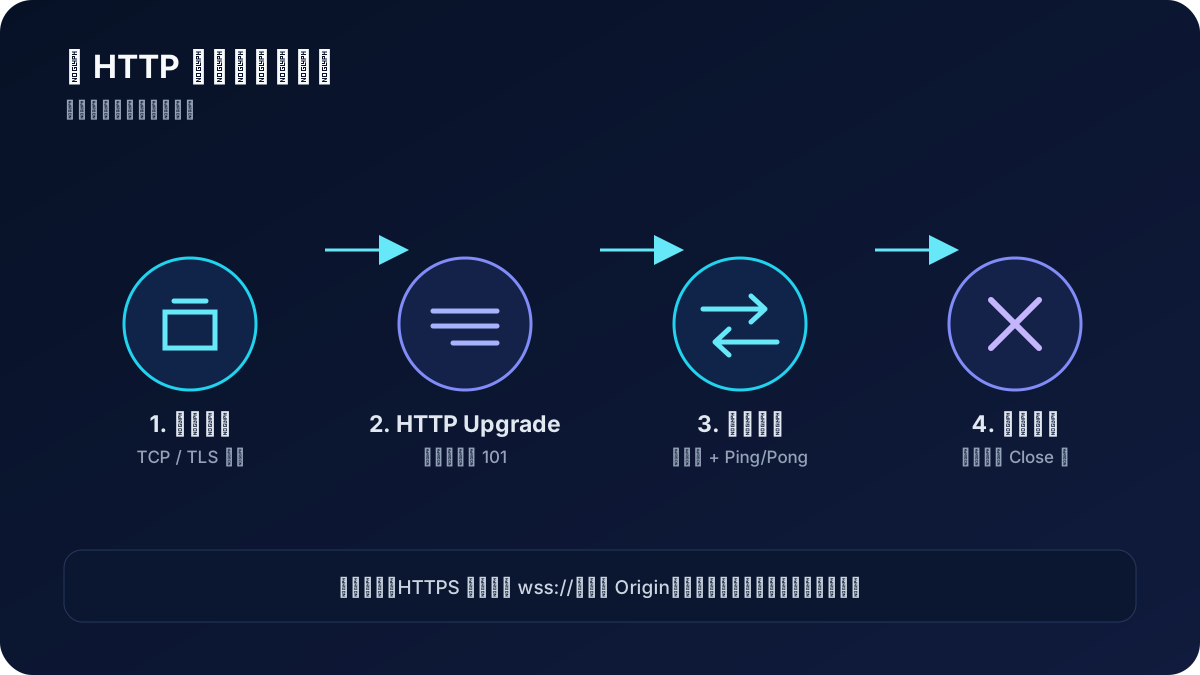
握手只负责把 HTTP 连接升级为 WebSocket。升级成功后,业务消息通过数据帧传输;Ping/Pong 是协议级控制帧,主要用于判断连接是否仍然可用。正常退出时双方应交换 Close 帧,而不是直接中断 TCP。
核心特征
- 全双工通信:客户端和服务器可同时发送和接收数据
- 长连接:一次握手,持续通信,减少连接开销
- 低延迟:无需 HTTP 请求/响应循环,数据直接传输
- 低带宽占用:帧头部开销小,适合频繁数据交换
- 协议扩展:支持子协议和扩展机制
应用场景
- 实时聊天系统:即时消息、群聊、客服系统
- 在线游戏:多人实时对战、游戏状态同步
- 实时监控:系统监控、日志实时展示、IoT 数据
- 协作工具:在线文档编辑、白板、代码协作
- 金融交易:股票行情、交易数据实时推送
- 直播互动:弹幕、礼物、实时评论
代码示例
服务端实现 (PHP/Workerman)
<?php

namespace app\process;

use Workerman\Connection\TcpConnection;
use Workerman\Timer;

/**
 * WebSocket 服务器实现
 * 支持用户认证、消息广播、心跳检测
 */
class WebSocket
{
    // 静态连接列表,所有worker进程共享
    public static $connectionList = [];
    // 静态用户列表,所有worker进程共享
    public static $userList = [];
    // 在线用户计数
    public static $onlineCount = 0;

    /**
     * 连接建立时触发
     * @param TcpConnection $connection
     */
    public function onConnect(TcpConnection $connection)
    {
        echo "新连接建立: {$connection->id}\n";
    }

    /**
     * WebSocket握手完成时触发
     * @param TcpConnection $connection
     */
    public function onWebSocketConnect(TcpConnection $connection)
    {
        echo "WebSocket连接建立: {$connection->id}\n";

        // 发送连接成功消息
        $connection->send(json_encode([
            'type' => 'system',
            'code' => 200,
            'message' => '连接成功,请发送认证信息',
            'data' => [
                'connection_id' => $connection->id,
                'timestamp' => time()
            ]
        ]));
    }

    /**
     * 收到消息时触发
     * @param TcpConnection $connection
     * @param string $data
     */
    public function onMessage(TcpConnection $connection, $data)
    {
        try {
            $data = json_decode($data, true);

            if (!$data || !isset($data['type'])) {
                $this->sendError($connection, 400, '消息格式错误');
                return;
            }

            $type = $data['type'];

            switch ($type) {
                case 'auth':
                    $this->handleAuth($connection, $data);
                    break;
                case 'message':
                    $this->handleMessage($connection, $data);
                    break;
                case 'heartbeat':
                    $this->handleHeartbeat($connection);
                    break;
                default:
                    $this->sendError($connection, 400, '未知消息类型');
            }
        } catch (\Exception $e) {
            echo "处理消息异常: {$e->getMessage()}\n";
            $this->sendError($connection, 500, '服务器内部错误');
        }
    }

    /**
     * 处理用户认证
     * @param TcpConnection $connection
     * @param array $data
     */
    private function handleAuth(TcpConnection $connection, $data)
    {
        if (!isset($data['data']['token'])) {
            $this->sendError($connection, 400, '缺少token参数');
            return;
        }

        // 验证token(这里需要实现具体的验证逻辑)
        $user = $this->verifyToken($data['data']['token']);
        if (!$user) {
            $connection->send(json_encode([
                'type' => 'auth_failed',
                'code' => 401,
                'message' => 'token失效或无效'
            ]));
            $connection->close();
            return;
        }

        // 检查用户是否已经在线(踢出旧连接)
        $this->kickExistingUser($user['user_id']);

        // 保存连接和用户信息
        static::$connectionList[$connection->id] = $connection;
        static::$userList[$connection->id] = $user;
        static::$onlineCount++;

        // 发送认证成功消息
        $connection->send(json_encode([
            'type' => 'auth_success',
            'code' => 200,
            'message' => '认证成功',
            'data' => [
                'user' => [
                    'id' => $user['user_id'],
                    'username' => $user['username']
                ],
                'online_count' => static::$onlineCount
            ]
        ]));

        // 广播用户上线消息
        $this->broadcast([
            'type' => 'user_online',
            'code' => 200,
            'message' => '用户上线',
            'data' => [
                'user' => [
                    'id' => $user['user_id'],
                    'username' => $user['username']
                ],
                'online_count' => static::$onlineCount,
                'timestamp' => time() * 1000
            ]
        ], $connection->id);

        echo "用户 {$user['username']} 认证成功,当前在线: " . static::$onlineCount . "\n";
    }

    /**
     * 处理聊天消息
     * @param TcpConnection $connection
     * @param array $data
     */
    private function handleMessage(TcpConnection $connection, $data)
    {
        // 检查用户是否已认证
        if (!isset(static::$userList[$connection->id])) {
            $this->sendError($connection, 401, '请先进行身份认证');
            return;
        }

        if (!isset($data['data']['text']) || empty(trim($data['data']['text']))) {
            $this->sendError($connection, 400, '消息内容不能为空');
            return;
        }

        $user = static::$userList[$connection->id];
        $message = [
            'type' => 'message',
            'code' => 200,
            'data' => [
                'id' => uniqid(),
                'sender' => [
                    'id' => $user['user_id'],
                    'username' => $user['username']
                ],
                'text' => htmlspecialchars(trim($data['data']['text'])),
                'timestamp' => time() * 1000
            ]
        ];

        // 广播消息给所有在线用户
        $this->broadcast($message);

        echo "用户 {$user['username']} 发送消息: {$data['data']['text']}\n";
    }

    /**
     * 处理心跳
     * @param TcpConnection $connection
     */
    private function handleHeartbeat(TcpConnection $connection)
    {
        $connection->send(json_encode([
            'type' => 'heartbeat',
            'code' => 200,
            'message' => 'pong',
            'timestamp' => time() * 1000
        ]));
    }

    /**
     * 发送错误消息
     * @param TcpConnection $connection
     * @param int $code
     * @param string $message
     */
    private function sendError(TcpConnection $connection, $code, $message)
    {
        $connection->send(json_encode([
            'type' => 'error',
            'code' => $code,
            'message' => $message
        ]));
    }

    /**
     * 验证token(示例实现)
     * @param string $token
     * @return array|false
     */
    private function verifyToken($token)
    {
        // 这里应该实现真实的token验证逻辑
        // 例如:查询数据库、验证JWT等
        if ($token === 'valid_token') {
            return [
                'user_id' => 1,
                'username' => 'test_user'
            ];
        }
        return false;
    }

    /**
     * 踢出已存在的用户连接
     * @param int $userId
     */
    private function kickExistingUser($userId)
    {
        foreach (static::$userList as $connId => $userData) {
            if ($userData['user_id'] == $userId) {
                if (isset(static::$connectionList[$connId])) {
                    static::$connectionList[$connId]->send(json_encode([
                        'type' => 'kicked',
                        'code' => 409,
                        'message' => '您的账号在其他地方登录'
                    ]));
                    static::$connectionList[$connId]->close();
                }
                unset(static::$connectionList[$connId]);
                unset(static::$userList[$connId]);
                static::$onlineCount--;
            }
        }
    }

    /**
     * 广播消息给所有在线用户
     * @param array $message
     * @param string|null $excludeConnectionId
     */
    private function broadcast($message, $excludeConnectionId = null)
    {
        $messageJson = json_encode($message);

        foreach (static::$connectionList as $connId => $conn) {
            if ($excludeConnectionId && $connId == $excludeConnectionId) {
                continue;
            }

            try {
                $conn->send($messageJson);
            } catch (\Exception $e) {
                echo "发送消息失败,移除连接: {$connId}\n";
                $this->removeConnection($connId);
            }
        }
    }

    /**
     * 连接关闭时触发
     * @param TcpConnection $connection
     */
    public function onClose(TcpConnection $connection)
    {
        $this->removeConnection($connection->id);
        echo "连接关闭: {$connection->id}\n";
    }

    /**
     * 移除连接
     * @param string $connectionId
     */
    private function removeConnection($connectionId)
    {
        if (isset(static::$userList[$connectionId])) {
            $user = static::$userList[$connectionId];

            // 广播用户下线消息
            $this->broadcast([
                'type' => 'user_offline',
                'code' => 200,
                'message' => '用户下线',
                'data' => [
                    'user' => [
                        'id' => $user['user_id'],
                        'username' => $user['username']
                    ],
                    'online_count' => static::$onlineCount - 1,
                    'timestamp' => time() * 1000
                ]
            ], $connectionId);

            unset(static::$userList[$connectionId]);
            static::$onlineCount--;

            echo "用户 {$user['username']} 下线,当前在线: " . static::$onlineCount . "\n";
        }

        if (isset(static::$connectionList[$connectionId])) {
            unset(static::$connectionList[$connectionId]);
        }
    }

    /**
     * 获取在线用户列表
     * @return array
     */
    public static function getOnlineUsers()
    {
        $users = [];
        foreach (static::$userList as $userData) {
            $users[] = [
                'id' => $userData['user_id'],
                'username' => $userData['username']
            ];
        }
        return $users;
    }

    /**
     * 获取在线用户数量
     * @return int
     */
    public static function getOnlineCount()
    {
        return static::$onlineCount;
    }
}
客户端实现 (JavaScript)
/**
 * WebSocket 客户端封装类
 * 支持自动重连、心跳检测、消息队列
 */
class WebSocketClient {
    constructor(url, options = {}) {
        this.url = url;
        this.options = {
            reconnectInterval: 3000,    // 重连间隔
            maxReconnectAttempts: 5,    // 最大重连次数
            heartbeatInterval: 30000,   // 心跳间隔
            ...options
        };

        this.ws = null;
        this.reconnectAttempts = 0;
        this.heartbeatTimer = null;
        this.messageQueue = [];         // 消息队列
        this.isConnected = false;
        this.isConnecting = false;

        // 事件回调
        this.onOpen = null;
        this.onMessage = null;
        this.onClose = null;
        this.onError = null;
        this.onReconnect = null;
    }

    /**
     * 连接WebSocket
     */
    connect() {
        if (this.isConnected || this.isConnecting) {
            console.warn('WebSocket已连接或正在连接中');
            return;
        }

        this.isConnecting = true;

        try {
            this.ws = new WebSocket(this.url);

            this.ws.onopen = (event) => {
                console.log('WebSocket连接已建立');
                this.isConnected = true;
                this.isConnecting = false;
                this.reconnectAttempts = 0;

                // 发送队列中的消息
                this.flushMessageQueue();

                // 启动心跳
                this.startHeartbeat();

                // 触发回调
                if (this.onOpen) {
                    this.onOpen(event);
                }
            };

            this.ws.onmessage = (event) => {
                try {
                    const data = JSON.parse(event.data);
                    this.handleMessage(data);
                } catch (error) {
                    console.error('解析WebSocket消息失败:', error);
                }
            };

            this.ws.onclose = (event) => {
                console.log('WebSocket连接已关闭', event.code, event.reason);
                this.isConnected = false;
                this.isConnecting = false;

                // 停止心跳
                this.stopHeartbeat();

                // 触发回调
                if (this.onClose) {
                    this.onClose(event);
                }

                // 尝试重连
                this.attemptReconnect();
            };

            this.ws.onerror = (error) => {
                console.error('WebSocket连接错误:', error);
                this.isConnecting = false;

                // 触发回调
                if (this.onError) {
                    this.onError(error);
                }
            };

        } catch (error) {
            console.error('创建WebSocket连接失败:', error);
            this.isConnecting = false;
        }
    }

    /**
     * 处理接收到的消息
     * @param {Object} data
     */
    handleMessage(data) {
        switch (data.type) {
            case 'heartbeat':
                // 心跳响应,无需处理
                break;
            case 'error':
                console.error('服务器错误:', data.message);
                break;
            case 'kicked':
                console.warn('账号在其他地方登录,连接被踢出');
                this.disconnect();
                break;
            default:
                // 触发消息回调
                if (this.onMessage) {
                    this.onMessage(data);
                }
        }
    }

    /**
     * 发送消息
     * @param {Object} message
     */
    send(message) {
        if (this.isConnected && this.ws.readyState === WebSocket.OPEN) {
            try {
                this.ws.send(JSON.stringify(message));
            } catch (error) {
                console.error('发送消息失败:', error);
                // 将消息加入队列,等待重连后发送
                this.messageQueue.push(message);
            }
        } else {
            // 连接未建立,将消息加入队列
            this.messageQueue.push(message);
            console.warn('连接未建立,消息已加入队列');
        }
    }

    /**
     * 发送认证消息
     * @param {string} token
     */
    authenticate(token) {
        this.send({
            type: 'auth',
            data: {
                token: token
            }
        });
    }

    /**
     * 发送聊天消息
     * @param {string} text
     */
    sendMessage(text) {
        this.send({
            type: 'message',
            data: {
                text: text
            }
        });
    }

    /**
     * 发送心跳
     */
    sendHeartbeat() {
        this.send({
            type: 'heartbeat'
        });
    }

    /**
     * 启动心跳检测
     */
    startHeartbeat() {
        this.stopHeartbeat(); // 先停止之前的心跳

        this.heartbeatTimer = setInterval(() => {
            if (this.isConnected) {
                this.sendHeartbeat();
            }
        }, this.options.heartbeatInterval);
    }

    /**
     * 停止心跳检测
     */
    stopHeartbeat() {
        if (this.heartbeatTimer) {
            clearInterval(this.heartbeatTimer);
            this.heartbeatTimer = null;
        }
    }

    /**
     * 发送队列中的消息
     */
    flushMessageQueue() {
        while (this.messageQueue.length > 0) {
            const message = this.messageQueue.shift();
            this.send(message);
        }
    }

    /**
     * 尝试重连
     */
    attemptReconnect() {
        if (this.reconnectAttempts >= this.options.maxReconnectAttempts) {
            console.error('达到最大重连次数,停止重连');
            return;
        }

        this.reconnectAttempts++;
        console.log(`尝试第 ${this.reconnectAttempts} 次重连...`);

        setTimeout(() => {
            if (!this.isConnected) {
                if (this.onReconnect) {
                    this.onReconnect(this.reconnectAttempts);
                }
                this.connect();
            }
        }, this.options.reconnectInterval);
    }

    /**
     * 断开连接
     */
    disconnect() {
        this.stopHeartbeat();

        if (this.ws) {
            this.ws.close();
            this.ws = null;
        }

        this.isConnected = false;
        this.isConnecting = false;
        this.reconnectAttempts = 0;
    }

    /**
     * 获取连接状态
     */
    getReadyState() {
        return this.ws ? this.ws.readyState : WebSocket.CLOSED;
    }
}

// 使用示例
const wsClient = new WebSocketClient('ws://127.0.0.1:2345/ws', {
    reconnectInterval: 3000,
    maxReconnectAttempts: 5,
    heartbeatInterval: 30000
});

// 设置事件回调
wsClient.onOpen = (event) => {
    console.log('连接已建立,开始认证');
    wsClient.authenticate(localStorage.getItem('token'));
};

wsClient.onMessage = (data) => {
    console.log('收到消息:', data);

    switch (data.type) {
        case 'auth_success':
            console.log('认证成功');
            break;
        case 'auth_failed':
            console.error('认证失败:', data.message);
            break;
        case 'message':
            displayMessage(data.data);
            break;
        case 'user_online':
        case 'user_offline':
            updateOnlineUsers(data.data);
            break;
    }
};

wsClient.onClose = (event) => {
    console.log('连接已关闭');
};

wsClient.onError = (error) => {
    console.error('连接错误:', error);
};

wsClient.onReconnect = (attempt) => {
    console.log(`正在进行第 ${attempt} 次重连...`);
};

// 连接WebSocket
wsClient.connect();

// 发送消息示例
function sendChatMessage(text) {
    wsClient.sendMessage(text);
}

// 显示消息的函数(需要根据实际UI实现)
function displayMessage(messageData) {
    // 实现消息显示逻辑
    console.log(`${messageData.sender.username}: ${messageData.text}`);
}

// 更新在线用户的函数(需要根据实际UI实现)
function updateOnlineUsers(data) {
    // 实现在线用户列表更新逻辑
    console.log(`在线用户数: ${data.online_count}`);
}
性能优化
1. 连接管理
- 连接池:复用连接,避免频繁建立和关闭
- 负载均衡:多服务器部署,分散连接压力
- 连接限制:设置单个客户端最大连接数
2. 消息处理
- 消息压缩:启用 permessage-deflate 扩展
- 批量处理:合并小消息,减少帧数量
- 异步处理:避免阻塞主线程
3. 内存优化
- 消息队列限制:防止内存泄漏
- 定期清理:清理无效连接和过期数据
- 对象池:复用消息对象
安全性考虑
1. 认证和授权
// 使用JWT进行认证
const token = localStorage.getItem('jwt_token');
ws.send(JSON.stringify({
    type: 'auth',
    data: { token }
}));
2. 数据验证
// 服务端验证消息格式
if (!isset($data['type']) || !in_array($data['type'], ['auth', 'message', 'heartbeat'])) {
    $connection->close();
    return;
}
3. 防护措施
- CSRF 防护:验证 Origin 头部
- XSS 防护:转义用户输入内容
- 频率限制:防止消息轰炸
- SSL/TLS:使用 WSS 加密传输
常见问题与解决方案
1. 连接断开问题
问题:网络不稳定导致连接频繁断开 解决方案:
- 实现自动重连机制
- 添加指数退避策略
- 使用心跳检测维持连接
2. 消息丢失问题
问题:网络异常时消息可能丢失 解决方案:
- 实现消息确认机制
- 添加消息队列和重发机制
- 使用消息ID去重
3. 内存泄漏问题
问题:长时间运行导致内存占用过高 解决方案:
- 及时清理无效连接
- 限制消息队列大小
- 定期重启服务进程
4. 跨域问题
问题:浏览器能发起跨站 WebSocket 握手,服务端却没有校验来源。
解决方案:WebSocket 握手不使用普通 Fetch/XHR 的 CORS 流程,不能靠 Access-Control-Allow-Origin: * 解决。服务端应校验握手请求的 Origin,只允许可信站点;鉴权失败直接拒绝升级。
浏览器兼容性
WebSocket 已被现代桌面和移动浏览器广泛支持。业务通常无需维护原生 WebSocket 的 polyfill;如果必须兼容不支持 WebSocket 的受限环境,应把长轮询或 SockJS 当作另一套传输方案,并由客户端和服务端共同协商,而不是直接覆盖 window.WebSocket。
兼容性和安全要求会变化,上线前可查阅 MDN WebSocket 客户端指南。
最佳实践
1. 错误处理
// 完善的错误处理
ws.onerror = (error) => {
    console.error('WebSocket错误:', error);
    // 记录错误日志
    logError('websocket_error', error);
    // 显示用户友好的错误信息
    showUserMessage('连接出现问题,正在尝试重连...');
};
2. 状态管理
// 使用状态机管理连接状态
const ConnectionState = {
    CONNECTING: 'connecting',
    CONNECTED: 'connected',
    DISCONNECTED: 'disconnected',
    RECONNECTING: 'reconnecting'
};
3. 消息格式标准化
// 统一的消息格式
const MessageFormat = {
    type: 'string',      // 消息类型
    code: 'number',      // 状态码
    message: 'string',   // 描述信息
    data: 'object',      // 数据内容
    timestamp: 'number'  // 时间戳
};
4. 监控和日志
// 服务端监控
class WebSocketMonitor {
    public static function logConnection($connectionId, $action) {
        $log = [
            'connection_id' => $connectionId,
            'action' => $action,
            'timestamp' => time(),
            'memory_usage' => memory_get_usage(true)
        ];
        file_put_contents('/var/log/websocket.log', json_encode($log) . "\n", FILE_APPEND);
    }
}
WebSocket 适合需要服务端主动推送、消息频繁且延迟敏感的场景。落地时应重点验证鉴权续期、Origin 校验、心跳与空闲超时、背压、消息大小限制和断线重连;HTTPS 页面统一使用 wss://,避免混合内容被浏览器拦截。
协议细节可继续查阅 RFC 6455。