
引言
GoFrame 是一个模块化、高性能、企业级的 Golang 应用开发框架,提供了丰富的功能组件。文件上传是 Web 应用中常见的需求,GoFrame 框架提供了简单而强大的文件上传处理能力。本文将详细介绍如何在 GoFrame 中实现文件上传功能,包括基本配置、API 使用、安全处理以及最佳实践。
目录
基础知识
GoFrame 文件上传概述
GoFrame 框架通过 ghttp.Request 对象提供了便捷的文件上传处理能力。上传的文件会被封装为 *ghttp.UploadFile 对象,该对象提供了丰富的方法来操作上传文件,如获取文件信息、保存文件等。
文件上传相关接口
GoFrame 中与文件上传相关的主要接口和方法包括:
GetUploadFile(name string) *UploadFile:获取指定名称的上传文件对象GetUploadFiles(name string) []*UploadFile:获取同名称的多个上传文件对象UploadFile.Save(dirPath string, randomlyRename ...bool) (string, error):保存上传文件到指定目录UploadFile.GetFilename() string:获取上传文件的原始文件名UploadFile.GetSize() int64:获取上传文件大小UploadFile.GetTempFile() string:获取上传文件的临时文件路径
配置说明
上传目录配置
在 GoFrame 中,上传文件通常保存在应用的特定目录中。建议在应用配置文件中定义上传目录:
# config.yaml
upload:
  path: "./public/uploads"
  temp: "./temp"
然后在代码中可以通过配置管理获取上传路径:
uploadPath := g.Cfg().GetString("upload.path")
文件大小限制
GoFrame 默认的上传文件大小限制为 10MB。可以通过服务配置修改这个限制:
s := g.Server()
s.SetMaxHeaderBytes(20 * 1024 * 1024) // 设置为 20MB
文件类型限制
可以在处理上传文件时验证文件类型,确保只接受特定类型的文件:
func checkFileType(filename string, allowTypes []string) bool {
	fileExt := strings.ToLower(filepath.Ext(filename))
	for _, allowExt := range allowTypes {
		if fileExt == allowExt {
			return true
		}
	}
	return false
}
基本使用
单文件上传
以下是单文件上传的基本示例:
func UploadFile(r *ghttp.Request) {
	file := r.GetUploadFile("file")
	if file == nil {
		r.Response.WriteJson(g.Map{
			"code":    1,
			"message": "未上传文件",
		})
		return
	}

	// 保存文件到指定目录,第二个参数为 true 表示使用随机文件名
	filename, err := file.Save("./public/uploads/", true)
	if err != nil {
		r.Response.WriteJson(g.Map{
			"code":    1,
			"message": err.Error(),
		})
		return
	}

	// 构建访问URL
	url := fmt.Sprintf("/uploads/%s", filename)
	r.Response.WriteJson(g.Map{
		"code":    0,
		"message": "上传成功",
		"data": g.Map{
			"filename": filename,
			"url":      url,
		},
	})
}
多文件上传
处理多文件上传的示例:
func UploadFiles(r *ghttp.Request) {
	files := r.GetUploadFiles("files")
	if len(files) == 0 {
		r.Response.WriteJson(g.Map{
			"code":    1,
			"message": "未上传文件",
		})
		return
	}

	var fileInfos []g.Map
	for _, file := range files {
		filename, err := file.Save("./public/uploads/", true)
		if err != nil {
			continue
		}
		url := fmt.Sprintf("/uploads/%s", filename)
		fileInfos = append(fileInfos, g.Map{
			"filename": filename,
			"url":      url,
		})
	}

	r.Response.WriteJson(g.Map{
		"code":    0,
		"message": "上传成功",
		"data":    fileInfos,
	})
}
自定义文件名
如果需要自定义上传文件的保存名称,可以使用以下方式:
func UploadWithCustomName(r *ghttp.Request) {
	file := r.GetUploadFile("file")
	if file == nil {
		r.Response.WriteJson(g.Map{
			"code":    1,
			"message": "未上传文件",
		})
		return
	}

	// 获取原始文件名和扩展名
	originalName := file.GetFilename()
	ext := filepath.Ext(originalName)

	// 生成自定义文件名(这里使用时间戳+随机数)
	customName := fmt.Sprintf("%d_%d%s", gtime.TimestampMilli(), grand.N(1000, 9999), ext)

	// 保存到临时目录
	tempFile := file.GetTempFile()

	// 手动复制文件到目标位置
	uploadDir := "./public/uploads/"
	if !gfile.Exists(uploadDir) {
		gfile.Mkdir(uploadDir)
	}

	targetPath := uploadDir + customName
	if err := gfile.Copy(tempFile, targetPath); err != nil {
		r.Response.WriteJson(g.Map{
			"code":    1,
			"message": err.Error(),
		})
		return
	}

	url := fmt.Sprintf("/uploads/%s", customName)
	r.Response.WriteJson(g.Map{
		"code":    0,
		"message": "上传成功",
		"data": g.Map{
			"filename": customName,
			"url":      url,
		},
	})
}
高级用法
文件验证
上传文件时进行验证,确保文件符合要求:
func UploadWithValidation(r *ghttp.Request) {
	file := r.GetUploadFile("file")
	if file == nil {
		r.Response.WriteJson(g.Map{
			"code":    1,
			"message": "未上传文件",
		})
		return
	}

	// 验证文件大小
	if file.GetSize() > 5*1024*1024 { // 5MB
		r.Response.WriteJson(g.Map{
			"code":    1,
			"message": "文件大小不能超过5MB",
		})
		return
	}

	// 验证文件类型
	allowTypes := []string{".jpg", ".jpeg", ".png", ".gif"}
	fileExt := strings.ToLower(filepath.Ext(file.GetFilename()))
	validType := false
	for _, ext := range allowTypes {
		if fileExt == ext {
			validType = true
			break
		}
	}

	if !validType {
		r.Response.WriteJson(g.Map{
			"code":    1,
			"message": "只允许上传JPG/JPEG/PNG/GIF格式的图片",
		})
		return
	}

	// 保存文件
	filename, err := file.Save("./public/uploads/", true)
	if err != nil {
		r.Response.WriteJson(g.Map{
			"code":    1,
			"message": err.Error(),
		})
		return
	}

	url := fmt.Sprintf("/uploads/%s", filename)
	r.Response.WriteJson(g.Map{
		"code":    0,
		"message": "上传成功",
		"data": g.Map{
			"filename": filename,
			"url":      url,
		},
	})
}
图片处理
结合图片处理库对上传的图片进行处理:
// 需要先安装图片处理库: go get -u github.com/disintegration/imaging

import (
	"github.com/disintegration/imaging"
	"github.com/gogf/gf/v2/frame/g"
	"github.com/gogf/gf/v2/net/ghttp"
	"image"
)

func UploadAndResizeImage(r *ghttp.Request) {
	file := r.GetUploadFile("file")
	if file == nil {
		r.Response.WriteJson(g.Map{
			"code":    1,
			"message": "未上传文件",
		})
		return
	}

	// 保存原始文件
	filename, err := file.Save("./public/uploads/original/", true)
	if err != nil {
		r.Response.WriteJson(g.Map{
			"code":    1,
			"message": err.Error(),
		})
		return
	}

	// 打开图片进行处理
	srcPath := "./public/uploads/original/" + filename
	src, err := imaging.Open(srcPath)
	if err != nil {
		r.Response.WriteJson(g.Map{
			"code":    1,
			"message": "图片处理失败: " + err.Error(),
		})
		return
	}

	// 创建缩略图
	thumbnail := imaging.Resize(src, 300, 0, imaging.Lanczos)

	// 保存缩略图
	thumbnailPath := "./public/uploads/thumbnail/" + filename
	if err := imaging.Save(thumbnail, thumbnailPath); err != nil {
		r.Response.WriteJson(g.Map{
			"code":    1,
			"message": "缩略图保存失败: " + err.Error(),
		})
		return
	}

	r.Response.WriteJson(g.Map{
		"code":    0,
		"message": "上传并处理成功",
		"data": g.Map{
			"filename":  filename,
			"original":  "/uploads/original/" + filename,
			"thumbnail": "/uploads/thumbnail/" + filename,
		},
	})
}
分片上传
对于大文件,可以实现分片上传:
func UploadChunk(r *ghttp.Request) {
	// 获取分片信息
	chunkIndex := r.GetInt("chunk_index")
	chunkTotal := r.GetInt("chunk_total")
	fileId := r.GetString("file_id")

	if fileId == "" || chunkTotal == 0 {
		r.Response.WriteJson(g.Map{
			"code":    1,
			"message": "参数错误",
		})
		return
	}

	// 获取上传的分片文件
	file := r.GetUploadFile("file")
	if file == nil {
		r.Response.WriteJson(g.Map{
			"code":    1,
			"message": "未上传文件",
		})
		return
	}

	// 创建临时目录存储分片
	chunkDir := fmt.Sprintf("./temp/chunks/%s", fileId)
	if !gfile.Exists(chunkDir) {
		gfile.Mkdir(chunkDir)
	}

	// 保存分片
	chunkName := fmt.Sprintf("%d", chunkIndex)
	_, err := file.Save(chunkDir+"/", false, chunkName)
	if err != nil {
		r.Response.WriteJson(g.Map{
			"code":    1,
			"message": "分片保存失败: " + err.Error(),
		})
		return
	}

	// 检查是否所有分片都已上传
	chunks, _ := gfile.ScanDir(chunkDir, "*")
	if len(chunks) == chunkTotal {
		// 所有分片已上传,合并文件
		originalName := r.GetString("original_name")
		ext := filepath.Ext(originalName)
		mergedName := fmt.Sprintf("%s%s", fileId, ext)
		mergedPath := "./public/uploads/" + mergedName

		// 创建目标文件
		targetFile, err := os.Create(mergedPath)
		if err != nil {
			r.Response.WriteJson(g.Map{
				"code":    1,
				"message": "创建合并文件失败: " + err.Error(),
			})
			return
		}
		defer targetFile.Close()

		// 按顺序合并分片
		for i := 0; i < chunkTotal; i++ {
			chunkPath := fmt.Sprintf("%s/%d", chunkDir, i)
			chunkData, err := ioutil.ReadFile(chunkPath)
			if err != nil {
				r.Response.WriteJson(g.Map{
					"code":    1,
					"message": "读取分片失败: " + err.Error(),
				})
				return
			}

			if _, err := targetFile.Write(chunkData); err != nil {
				r.Response.WriteJson(g.Map{
					"code":    1,
					"message": "写入合并文件失败: " + err.Error(),
				})
				return
			}
		}

		// 清理临时分片
		gfile.Remove(chunkDir)

		r.Response.WriteJson(g.Map{
			"code":    0,
			"message": "文件上传完成",
			"data": g.Map{
				"filename": mergedName,
				"url":      "/uploads/" + mergedName,
			},
		})
		return
	}

	// 返回当前分片上传成功
	r.Response.WriteJson(g.Map{
		"code":    0,
		"message": "分片上传成功",
		"data": g.Map{
			"chunk_index": chunkIndex,
			"chunk_total": chunkTotal,
		},
	})
}
完整示例
后端代码
以下是一个完整的文件上传控制器示例:
package controller

import (
	"fmt"
	"path/filepath"
	"strings"

	"github.com/gogf/gf/v2/frame/g"
	"github.com/gogf/gf/v2/net/ghttp"
	"github.com/gogf/gf/v2/os/gfile"
	"github.com/gogf/gf/v2/os/gtime"
	"github.com/gogf/gf/v2/util/grand"
)

// UploadController 文件上传控制器
type UploadController struct{}

// Upload 处理单文件上传
func (c *UploadController) Upload(r *ghttp.Request) {
	file := r.GetUploadFile("file")
	if file == nil {
		r.Response.WriteJson(g.Map{
			"code":    1,
			"message": "未上传文件",
		})
		return
	}

	// 验证文件类型
	allowTypes := []string{".jpg", ".jpeg", ".png", ".gif", ".pdf", ".doc", ".docx", ".xls", ".xlsx"}
	fileExt := strings.ToLower(filepath.Ext(file.GetFilename()))
	validType := false
	for _, ext := range allowTypes {
		if fileExt == ext {
			validType = true
			break
		}
	}

	if !validType {
		r.Response.WriteJson(g.Map{
			"code":    1,
			"message": "不支持的文件类型",
		})
		return
	}

	// 验证文件大小
	if file.GetSize() > 10*1024*1024 { // 10MB
		r.Response.WriteJson(g.Map{
			"code":    1,
			"message": "文件大小不能超过10MB",
		})
		return
	}

	// 获取上传目录配置
	uploadPath := g.Cfg().GetString("upload.path", "./public/uploads")
	if !gfile.Exists(uploadPath) {
		gfile.Mkdir(uploadPath)
	}

	// 生成自定义文件名
	originalName := file.GetFilename()
	ext := filepath.Ext(originalName)
	customName := fmt.Sprintf("%s_%d%s", gtime.Date(), grand.N(1000, 9999), ext)

	// 保存文件
	tempFile := file.GetTempFile()
	targetPath := filepath.Join(uploadPath, customName)
	if err := gfile.Copy(tempFile, targetPath); err != nil {
		r.Response.WriteJson(g.Map{
			"code":    1,
			"message": "文件保存失败: " + err.Error(),
		})
		return
	}

	// 构建访问URL
	url := fmt.Sprintf("/uploads/%s", customName)
	r.Response.WriteJson(g.Map{
		"code":    0,
		"message": "上传成功",
		"data": g.Map{
			"original_name": originalName,
			"filename":      customName,
			"url":           url,
			"size":          file.GetSize(),
		},
	})
}

// UploadMulti 处理多文件上传
func (c *UploadController) UploadMulti(r *ghttp.Request) {
	files := r.GetUploadFiles("files")
	if len(files) == 0 {
		r.Response.WriteJson(g.Map{
			"code":    1,
			"message": "未上传文件",
		})
		return
	}

	// 获取上传目录配置
	uploadPath := g.Cfg().GetString("upload.path", "./public/uploads")
	if !gfile.Exists(uploadPath) {
		gfile.Mkdir(uploadPath)
	}

	var fileInfos []g.Map
	for _, file := range files {
		// 验证文件类型和大小
		if file.GetSize() > 10*1024*1024 { // 10MB
			continue
		}

		// 生成自定义文件名
		originalName := file.GetFilename()
		ext := filepath.Ext(originalName)
		customName := fmt.Sprintf("%s_%d%s", gtime.Date(), grand.N(1000, 9999), ext)

		// 保存文件
		tempFile := file.GetTempFile()
		targetPath := filepath.Join(uploadPath, customName)
		if err := gfile.Copy(tempFile, targetPath); err != nil {
			continue
		}

		// 构建访问URL
		url := fmt.Sprintf("/uploads/%s", customName)
		fileInfos = append(fileInfos, g.Map{
			"original_name": originalName,
			"filename":      customName,
			"url":           url,
			"size":          file.GetSize(),
		})
	}

	if len(fileInfos) == 0 {
		r.Response.WriteJson(g.Map{
			"code":    1,
			"message": "所有文件上传失败",
		})
		return
	}

	r.Response.WriteJson(g.Map{
		"code":    0,
		"message": "上传成功",
		"data":    fileInfos,
	})
}
前端代码
使用 HTML 和 JavaScript 实现文件上传的前端代码:
<!DOCTYPE html>
<html>
<head>
    <title>GoFrame文件上传示例</title>
    <meta charset="UTF-8">
    <meta name="viewport" content="width=device-width, initial-scale=1.0">
    <style>
        body {
            font-family: Arial, sans-serif;
            max-width: 800px;
            margin: 0 auto;
            padding: 20px;
        }
        .upload-container {
            border: 2px dashed #ccc;
            padding: 20px;
            text-align: center;
            margin-bottom: 20px;
        }
        .upload-container.dragover {
            border-color: #007bff;
            background-color: #f8f9fa;
        }
        .file-list {
            margin-top: 20px;
        }
        .file-item {
            display: flex;
            align-items: center;
            padding: 10px;
            border-bottom: 1px solid #eee;
        }
        .file-item img {
            max-width: 100px;
            max-height: 100px;
            margin-right: 10px;
        }
        .progress-bar {
            height: 5px;
            background-color: #e9ecef;
            margin-top: 5px;
            border-radius: 3px;
            overflow: hidden;
        }
        .progress-bar-fill {
            height: 100%;
            background-color: #007bff;
            width: 0%;
            transition: width 0.3s;
        }
        .btn {
            padding: 8px 16px;
            background-color: #007bff;
            color: white;
            border: none;
            border-radius: 4px;
            cursor: pointer;
        }
        .btn:hover {
            background-color: #0069d9;
        }
    </style>
</head>
<body>
    <h1>GoFrame文件上传示例</h1>

    <h2>单文件上传</h2>
    <div class="upload-container" id="single-upload-container">
        <p>点击选择文件或拖拽文件到此处</p>
        <input type="file" id="file-input" style="display: none;">
        <button class="btn" id="select-file-btn">选择文件</button>
        <div class="progress-bar" id="single-progress" style="display: none;">
            <div class="progress-bar-fill" id="single-progress-fill"></div>
        </div>
    </div>

    <h2>多文件上传</h2>
    <div class="upload-container" id="multi-upload-container">
        <p>点击选择多个文件或拖拽文件到此处</p>
        <input type="file" id="files-input" multiple style="display: none;">
        <button class="btn" id="select-files-btn">选择多个文件</button>
    </div>

    <h2>已上传文件</h2>
    <div class="file-list" id="file-list"></div>

    <script>
        // 单文件上传相关元素
        const singleUploadContainer = document.getElementById('single-upload-container');
        const fileInput = document.getElementById('file-input');
        const selectFileBtn = document.getElementById('select-file-btn');
        const singleProgress = document.getElementById('single-progress');
        const singleProgressFill = document.getElementById('single-progress-fill');

        // 多文件上传相关元素
        const multiUploadContainer = document.getElementById('multi-upload-container');
        const filesInput = document.getElementById('files-input');
        const selectFilesBtn = document.getElementById('select-files-btn');

        // 文件列表
        const fileList = document.getElementById('file-list');

        // 单文件选择按钮点击事件
        selectFileBtn.addEventListener('click', () => {
            fileInput.click();
        });

        // 多文件选择按钮点击事件
        selectFilesBtn.addEventListener('click', () => {
            filesInput.click();
        });

        // 单文件选择变化事件
        fileInput.addEventListener('change', (e) => {
            if (e.target.files.length > 0) {
                uploadSingleFile(e.target.files[0]);
            }
        });

        // 多文件选择变化事件
        filesInput.addEventListener('change', (e) => {
            if (e.target.files.length > 0) {
                uploadMultipleFiles(e.target.files);
            }
        });

        // 拖拽相关事件
        [singleUploadContainer, multiUploadContainer].forEach(container => {
            container.addEventListener('dragover', (e) => {
                e.preventDefault();
                container.classList.add('dragover');
            });

            container.addEventListener('dragleave', () => {
                container.classList.remove('dragover');
            });

            container.addEventListener('drop', (e) => {
                e.preventDefault();
                container.classList.remove('dragover');

                if (e.dataTransfer.files.length > 0) {
                    if (container === singleUploadContainer) {
                        uploadSingleFile(e.dataTransfer.files[0]);
                    } else {
                        uploadMultipleFiles(e.dataTransfer.files);
                    }
                }
            });
        });

        // 上传单个文件
        function uploadSingleFile(file) {
            const formData = new FormData();
            formData.append('file', file);

            // 显示进度条
            singleProgress.style.display = 'block';
            singleProgressFill.style.width = '0%';

            const xhr = new XMLHttpRequest();
            xhr.open('POST', '/api/upload', true);

            // 进度事件
            xhr.upload.addEventListener('progress', (e) => {
                if (e.lengthComputable) {
                    const percentComplete = (e.loaded / e.total) * 100;
                    singleProgressFill.style.width = percentComplete + '%';
                }
            });

            // 完成事件
            xhr.addEventListener('load', () => {
                if (xhr.status === 200) {
                    try {
                        const response = JSON.parse(xhr.responseText);
                        if (response.code === 0) {
                            addFileToList(response.data);
                            alert('文件上传成功!');
                        } else {
                            alert('上传失败: ' + response.message);
                        }
                    } catch (e) {
                        alert('解析响应失败: ' + e.message);
                    }
                } else {
                    alert('上传失败,服务器返回状态码: ' + xhr.status);
                }

                // 隐藏进度条
                setTimeout(() => {
                    singleProgress.style.display = 'none';
                }, 1000);
            });

            // 错误事件
            xhr.addEventListener('error', () => {
                alert('上传失败,网络错误');
                singleProgress.style.display = 'none';
            });

            // 发送请求
            xhr.send(formData);
        }

        // 上传多个文件
        function uploadMultipleFiles(files) {
            const formData = new FormData();
            for (let i = 0; i < files.length; i++) {
                formData.append('files', files[i]);
            }

            const xhr = new XMLHttpRequest();
            xhr.open('POST', '/api/upload-multi', true);

            // 完成事件
            xhr.addEventListener('load', () => {
                if (xhr.status === 200) {
                    try {
                        const response = JSON.parse(xhr.responseText);
                        if (response.code === 0) {
                            response.data.forEach(fileInfo => {
                                addFileToList(fileInfo);
                            });
                            alert('文件上传成功!');
                        } else {
                            alert('上传失败: ' + response.message);
                        }
                    } catch (e) {
                        alert('解析响应失败: ' + e.message);
                    }
                } else {
                    alert('上传失败,服务器返回状态码: ' + xhr.status);
                }
            });

            // 错误事件
            xhr.addEventListener('error', () => {
                alert('上传失败,网络错误');
            });

            // 发送请求
            xhr.send(formData);
        }

        // 添加文件到列表
        function addFileToList(fileInfo) {
            const fileItem = document.createElement('div');
            fileItem.className = 'file-item';
            const fileURL = normalizeFileURL(fileInfo.url);

            // 如果是图片,显示缩略图
            const ext = fileInfo.filename.split('.').pop().toLowerCase();
            if (['jpg', 'jpeg', 'png', 'gif'].includes(ext)) {
                const img = document.createElement('img');
                img.src = fileURL;
                img.alt = fileInfo.original_name || fileInfo.filename;
                img.loading = 'lazy';
                fileItem.appendChild(img);
            }

            // 使用 DOM API 写入服务端返回值,避免 innerHTML 导致 DOM XSS。
            const fileInfoDiv = document.createElement('div');
            appendInfo(fileInfoDiv, '原始文件名:', fileInfo.original_name || fileInfo.filename);
            appendInfo(fileInfoDiv, '文件大小:', formatFileSize(fileInfo.size));
            appendInfo(fileInfoDiv, 'URL:', fileURL, fileURL);
            fileItem.appendChild(fileInfoDiv);

            // 添加到列表
            fileList.insertBefore(fileItem, fileList.firstChild);
        }

        function appendInfo(container, label, value, href = '') {
            const row = document.createElement('div');
            const strong = document.createElement('strong');
            strong.textContent = label;
            row.append(strong, document.createTextNode(' '));
            if (href) {
                const link = document.createElement('a');
                link.href = href;
                link.target = '_blank';
                link.rel = 'noopener';
                link.textContent = value;
                row.appendChild(link);
            } else {
                row.appendChild(document.createTextNode(String(value)));
            }
            container.appendChild(row);
        }

        function normalizeFileURL(rawURL) {
            const url = new URL(rawURL, window.location.origin);
            if (!['http:', 'https:'].includes(url.protocol)) {
                throw new Error('不支持的文件 URL 协议');
            }
            return url.href;
        }

        // 格式化文件大小
        function formatFileSize(bytes) {
            if (bytes === 0) return '0 Bytes';
            const k = 1024;
            const sizes = ['Bytes', 'KB', 'MB', 'GB', 'TB'];
            const i = Math.floor(Math.log(bytes) / Math.log(k));
            return parseFloat((bytes / Math.pow(k, i)).toFixed(2)) + ' ' + sizes[i];
        }
    </script>
</body>
</html>
安全考虑
安全校验要发生在文件进入最终存储之前,不能只依赖客户端提交的文件名或 Content-Type:
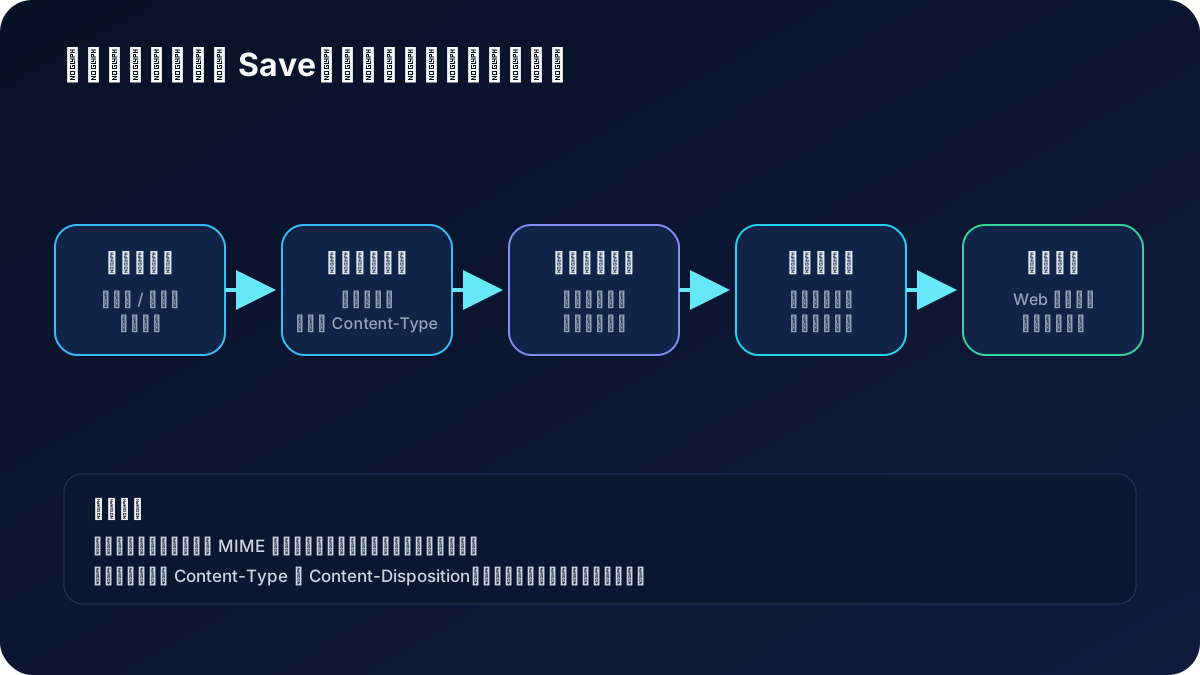
实现文件上传时,需要注意以下安全问题:
-
文件类型验证:始终验证上传文件的类型,只允许预期的文件类型。
-
文件大小限制:设置合理的文件大小限制,防止服务器资源被耗尽。
-
随机文件名:使用随机文件名存储上传的文件,避免文件名冲突和猜测。
-
存储路径安全:优先把上传目录放在 Web 根目录之外,通过受控接口读取;确需公开静态访问时,禁止脚本执行并固定响应类型。
-
文件内容验证:对于图片等文件,可以进行额外的内容验证,确保文件内容与声明的类型一致。
-
防止目录遍历攻击:不要把原始文件名直接拼进路径。服务端生成随机文件名,并在最终路径上校验其仍位于预期目录内;
filepath.Clean()本身不能替代边界校验。
常见问题与解决方案
1. 上传失败,无法获取上传文件
问题:调用 r.GetUploadFile() 返回 nil。
解决方案:
- 确保表单使用了
enctype="multipart/form-data" - 检查表单字段名称是否与代码中的一致
- 检查服务器配置的最大请求体大小限制
2. 文件保存失败
问题:调用 file.Save() 返回错误。
解决方案:
- 确保目标目录存在且有写入权限
- 检查磁盘空间是否充足
- 使用绝对路径而非相对路径
3. 上传大文件时超时
问题:上传大文件时请求超时。
解决方案:
- 增加服务器超时设置:
s.SetClientMaxBodySize(100 * 1024 * 1024) - 实现分片上传功能
- 使用进度条提供用户反馈
4. 上传文件类型错误
问题:用户上传了不允许的文件类型。
解决方案:
- 在前端和后端都进行文件类型验证
- 不仅检查文件扩展名,还可以检查文件头信息
最佳实践
-
使用配置文件:将上传目录、大小限制等配置放在配置文件中,便于管理和修改。
-
实现断点续传:对于大文件,实现断点续传功能,提高用户体验。
-
使用对象存储:考虑使用云存储服务(如阿里云OSS、腾讯云COS等)存储上传的文件,提高可靠性和扩展性。
-
异步处理:对于需要处理的文件(如图片裁剪、视频转码等),使用异步任务处理,避免阻塞请求。
-
日志记录:记录文件上传的相关信息,便于审计和问题排查。
-
定期清理:实现定期清理临时文件和无效文件的机制,避免磁盘空间浪费。
-
文件去重:对于重复上传的文件,可以实现文件去重功能,节省存储空间。
通过本文的学习,你应该已经掌握了在 GoFrame 中实现文件上传功能的各种方法和技巧。从基本的单文件上传到高级的分片上传,从文件验证到安全处理,这些知识将帮助你在实际项目中高效地实现文件上传功能。